1
NBA 2K26 Point Guard Build Guide: Best Iso Savant Build for Solo REC Dominance
Jun-30-2026 PST

In College Football 26, the ability to customize plays at the line of scrimmage is essential for consistent offensive success. This guide explains how to use hot routes to transform default plays into tailored attacks that exploit defensive weaknesses. Mastering these adjustments takes practice, but having the right roster and upgrades can make a significant difference—if you're looking to accelerate your team's progress, you can buy College Football 26 Coins from MMOEXP to strengthen your lineup and stay competitive from day one.
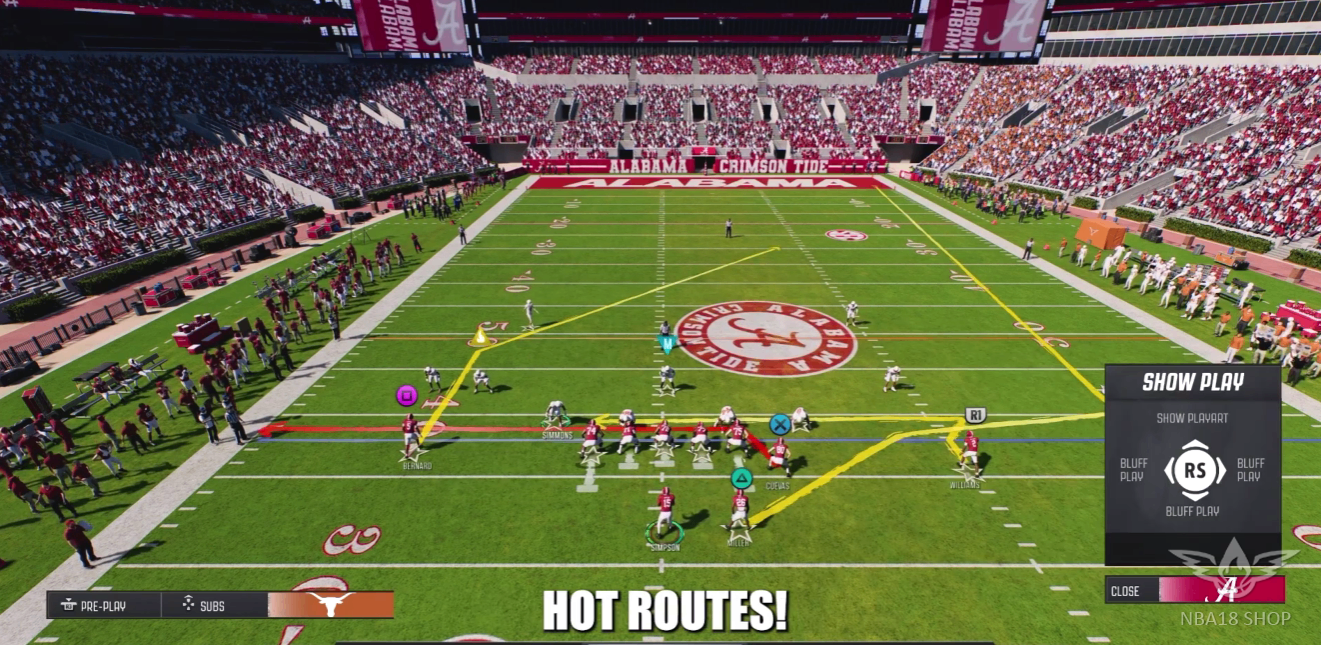
Hot routes allow you to change a receiver's route on the fly before the snap . This mechanic gives you the flexibility to adapt to defensive alignments and create favorable matchups. By modifying individual receiver paths, you can turn a basic play into a highly effective strategy against almost any defense .
Assigning hot routes follows a simple sequence of inputs:
Press Triangle (PlayStation) or Y (Xbox) to bring up the receiver selection menu .
Select the receiver you want to adjust by pressing their corresponding button icon displayed on screen .
Choose a hot route from the menu that appears. Up to 14 different route options are available, selected using the left stick, right stick, d-pad, and triggers .
The available hot route options vary depending on the receiver you select and their position on the field .
Drag: Triangle/Y > Receiver Icon > Right Stick Left
Dig: Triangle/Y > Receiver Icon > Right Stick Right
Post: Triangle/Y > Receiver Icon > Right Stick Up
Smart Routes expand on the standard hot route system by dynamically adjusting a receiver's path based on context, such as the first-down marker or end zone . Instead of simply selecting a new route, Smart Routes ensure the receiver extends to a critical yardage point before cutting .
How to use Smart Routes:
Bring up the hot route menu (Triangle/Y)
Select the receiver
Press R1 (PlayStation) or RB (Xbox) to activate the Smart Route
When to use Smart Routes:
Third-down situations where you need to reach the first-down marker
Red-zone plays where you want routes to extend to the end zone
Against defenses using soft or off coverage
Caution: Smart Routes can backfire against press coverage. If a defensive back jams the receiver at the line, extending the route gives them more time to recover and potentially intercept the pass .
Custom stemming allows you to adjust the depth and angle of a route pre-snap, giving you more control over how a receiver breaks into their pattern .
How to custom stem a route:
Bring up the hot route menu (Triangle/Y)
Select the receiver
Hold Left Bumper (L1/LB) and use the left stick or d-pad to adjust the stem direction (up, down, left, or right)
This technique is particularly effective for torching zone coverage by fine-tuning route timing and positioning .
A highly effective technique is the fully stemmed corner route, which beats both man and zone defenses .
How to execute:
Assign a corner route: Triangle/Y > Receiver Icon > Right Stick
To stem the route, hold Left Bumper and press Down on the left stick to create a sharp angle toward the sideline
Against Cover 3 defenses, this route consistently opens up for an easy possession catch. Against Cover 2, the route breaks over the cloud flats for potential big gains. In man coverage, the sharp cut makes it difficult for defenders to keep up .
Knowing how to assign routes is only half the equation. Understanding how to space them effectively is equally important .
Stacking multiple routes that break at the same depth makes the offense easier to defend. Zone and user defenders can sit in one spot and cover multiple options, particularly over the middle. For example, pairing a slant and a drag on the same side creates a traffic jam in the short zone .
To keep defenders off balance, mix route depths across the same side of the field. For example, combine a drag at 5 yards, a dig at 10 yards, and a post at 15+ yards. These layered combinations force defenders to commit to one level, opening up completions elsewhere .
It is not just where routes break, but when. Staggering the timing of breaks prevents defenders from jumping two routes at once. For instance, send a drag underneath that develops quickly, follow with a deep cross that breaks later, and finish with a delayed corner route. This keeps user defenders guessing and AI defenders occupied .
Your playbook already contains effective spacing concepts :
Flood: Combines a flat, corner, and streak on the same side
Levels: Staggers short, medium, and deep routes across the middle
Both concepts stress multiple zones and isolate defenders. Find them under Play Type > Concepts > Flood / Levels .
Hot routes are most effective when:
You identify a defensive alignment that leaves a specific receiver uncovered
You need to adjust for a blitz by creating quick outlet options
You want to exploit a mismatch, such as a slower linebacker covering a fast receiver
You are in a down-and-distance situation that requires specific yardage

NBA 2K26 Point Guard Build Guide: Best Iso Savant Build for Solo REC Dominance
Jun-30-2026 PST
10 Extremely Rare Cars in Forza Horizon 6 (Only 1% Players Own Them)
Jun-30-2026 PST
WoW TBC Classic Anniversary SSC Speedrun Guide: Master These Tricks to Dominate Serpentshrine Cavern
Jun-26-2026 PST
NBA 2K26 Season 8 Guide: All Rewards, Old Town Park Return, New Builds, and Best Progression Tips
Jun-25-2026 PST