1
NBA 2K26 Point Guard Build Guide: Best Iso Savant Build for Solo REC Dominance
Jun-30-2026 PST

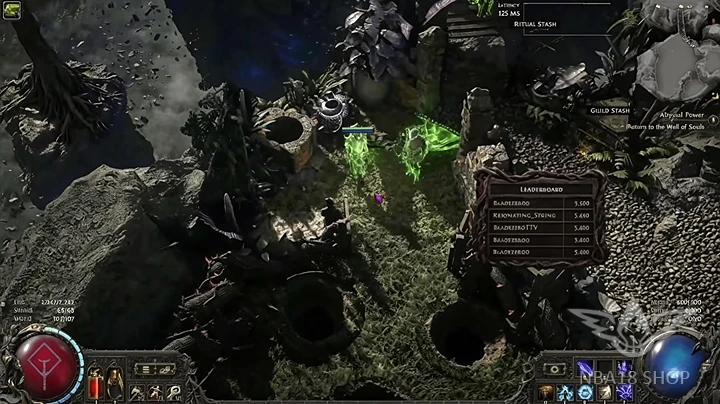
The foundation of the setup is a Warbringer bow build using Mirage Archer as the primary mechanic.
The build relies on:
· Multiple active Mirage Archers
· Ice Shot as the main attack skill
· Returning projectiles from Ironbound Bow
· Fork and Chain interactions
· Additional projectiles from passive tree investments
Instead of dealing damage directly, the character focuses on creating as many simultaneous projectile interactions as possible. Each Mirage Archer continuously fires attacks, multiplying the number of projectiles on screen.
The first objective is maximizing the number of Mirage Archers.
To do this:
1. Equip a Mirage Archer setup capable of maintaining several archers simultaneously.
2. Continuously attack and reposition to keep Mirage Archers active.
3. Use dodge rolls and movement skills to refresh Mirage Archer generation when necessary.
The test setup was capable of maintaining up to six Mirage Archers at once, creating a constant stream of attacks across the arena.
Although the build normally used Lightning Arrow, Ice Shot proved more effective for creating projectile interactions.
The process is simple:
1. Replace the primary attack with Ice Shot.
2. Keep Mirage Archer linked to the skill.
3. Allow all active Mirage Archers to repeatedly fire Ice Shot.
Ice Shot creates additional visual effects and projectile interactions, making it particularly useful when testing projectile scaling.
The next step is increasing projectile multiplication.
Link or acquire:
· Fork
· Ricochet
When projectiles hit targets, they can split into additional projectiles and continue traveling. This significantly increases the total number of active projectiles on screen.
The more projectiles that fork and ricochet, the greater the overall coverage and interaction count.
To maximize projectile output, several defensive nodes were removed and replaced with offensive projectile nodes.
Prioritize:
· Additional arrow chance
· Extra projectile effects
· Fork enhancements
· Chain improvements
· Projectile behavior modifiers
This approach sacrifices survivability but greatly increases the number of projectiles generated by each Mirage Archer.
The testing arena contains walls and terrain that can interact with chained projectiles.
To take advantage of this:
1. Allocate chain-related passive nodes.
2. Increase chain frequency where possible.
3. Position attacks near terrain and walls.
When projectiles repeatedly chain off nearby surfaces, overall projectile activity increases significantly.
While Mirage Archers handle most of the attacking, Tornado Shot can be added periodically.
The rotation becomes:
1. Summon and maintain Mirage Archers.
2. Fire Tornado Shot whenever possible.
3. Continue moving to sustain Mirage Archer uptime.
This introduces additional projectiles into the environment without disrupting the primary setup.
Several support gem combinations were tested to determine which created the highest projectile density.
One version used:
· Ice Shot
· Mirage Archer
· Fork
· Ricochet
· Cooldown Recovery
· Prolonged Duration
This setup focused on maintaining more Mirage Archers for longer periods.
A second version replaced Prolonged Duration with damage-focused support gems, increasing individual hit damage but reducing Mirage Archer uptime.
Testing both approaches helps determine whether projectile quantity or damage produces better results for a specific activity.
To further increase activity, special projectile interactions were added.
Examples included:
· Additional arrow effects
· Crescendo-style projectile generation
· Extra splitting mechanics
· More chain opportunities
Each added layer creates additional calculations and projectile paths, dramatically increasing the number of active effects.
As projectile density increases, monitor performance carefully.
Watch for:
· Rising latency
· Delayed skill activation
· Desynchronization
· Frame drops
· Server response delays
In the test scenario, latency regularly exceeded 1,000 milliseconds and occasionally reached 2,000 milliseconds due to the volume of projectile interactions being generated.
A key lesson from the testing process was that more projectiles do not always produce better results.
Players should compare:
· More Mirage Archers
· More chains and forks
· Greater screen coverage
· Higher visual density
· Fewer Mirage Archers
· Stronger support gems
· Faster target elimination
· More reliable performance
Finding the right balance depends on whether the goal is mapping efficiency, boss damage, or experimenting with projectile mechanics.
For actual gameplay rather than stress testing, consider:
1. Keeping core Mirage Archer mechanics.
2. Maintaining Fork and Chain only where beneficial.
3. Preserving defensive layers instead of removing them.
4. Investing in damage scaling alongside projectile scaling.
5. Avoiding excessive projectile effects that negatively impact performance.
This creates a smoother and more reliable build while still benefiting from the strengths of Mirage Archer gameplay.
This Mirage Archer Ice Shot setup demonstrates how projectile mechanics can be stacked to create massive screen coverage and extremely high interaction counts. By combining multiple Mirage Archers, additional arrows, Fork, Chain, returning projectiles, and terrain interactions, players can generate a huge number of simultaneous attacks. While the original experiment focused on pushing the limits of projectile density, the same concepts can be adapted into practical bow builds that clear maps efficiently while showcasing some of Path of Exile's most complex projectile interactions.

NBA 2K26 Point Guard Build Guide: Best Iso Savant Build for Solo REC Dominance
Jun-30-2026 PST
10 Extremely Rare Cars in Forza Horizon 6 (Only 1% Players Own Them)
Jun-30-2026 PST
WoW TBC Classic Anniversary SSC Speedrun Guide: Master These Tricks to Dominate Serpentshrine Cavern
Jun-26-2026 PST
NBA 2K26 Season 8 Guide: All Rewards, Old Town Park Return, New Builds, and Best Progression Tips
Jun-25-2026 PST